Contact Us

If you still have questions or prefer to get help directly from an agent, please submit a request.
We’ll get back to you as soon as possible.

Please fill out the contact form below and we will reply as soon as possible.

  • Contact Us
English (US)
AU English (AUS)
GB English (UK)
US English (US)
  • Home
  • Reading Eggs
  • 5 Simple Steps to Reading Eggs
  • 1. Start Here

2. Getting students started

Print login cards

Written by Elizabeth Carlson

Updated at May 27th, 2026

Contact Us

If you still have questions or prefer to get help directly from an agent, please submit a request.
We’ll get back to you as soon as possible.

Please fill out the contact form below and we will reply as soon as possible.

  • Reading Eggs
    Reading Eggs Guides 5 Simple Steps to Reading Eggs Reading Eggs FAQ's 3P Dashboard Reading Eggs Classroom Printable Videos Quick Tips Rollover What teachers are saying about Reading Eggs Professional Development
  • Mathseeds
    What is Mathseeds? Getting Started Professional Development Webinars Teacher Console Student Console Rollover Classroom Strategies & Tips Classroom Printables 3P Dashboard FAQ's Printable Guides What teachers are saying about Mathseeds Writing Legends Videos
+ More

Printing your students' Reading Eggs login cards is simple and easy.

Here's how: 

  1. Log in to your Reading Eggs Teacher Dashboard 
     
  2.  From the left-hand menu, select ‘Management’, then ‘Manage Students’
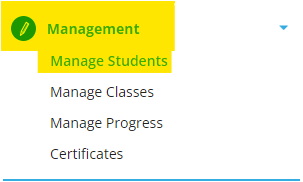

     
  3.  From your class roster, select all or some of the students for whom you'd like to print login cards
     
  4.  Once your students are selected, choose ‘Print logins’ from the top menu to print their login cards



Was this article helpful?

Yes
No
Give feedback about this article

Related Articles

  • 1. How to choose your reading program in Reading Eggs: Fast Phonics, Reading Eggs and Reading Eggspress
  • 4. Begin with lessons
  • 5. Assign content and review results
  • 3. The right level

Copyright 2026 – 3plearning.

Knowledge Base Software powered by Helpjuice

Expand